
- Education
- Estimated reading time:2 min read
Inventory Visibility That Goes Beyond Stock Counts
- By Stoify
A useful inventory view shows what is available, what is reserved, and where it can be fulfilled. Here is why that clarity matters as a store grows.
Share this page
The number beside a product rarely tells the whole inventory story. A team needs to know what is physically on hand, what is already reserved for orders, what remains available to sell, and where that stock is located.
When those answers are spread across warehouse notes, spreadsheets, and a storefront, the same question can produce different answers depending on who checks it. That uncertainty shows up as overselling, avoidable support work, and slower fulfillment decisions.
Separate on-hand, reserved, and available stock
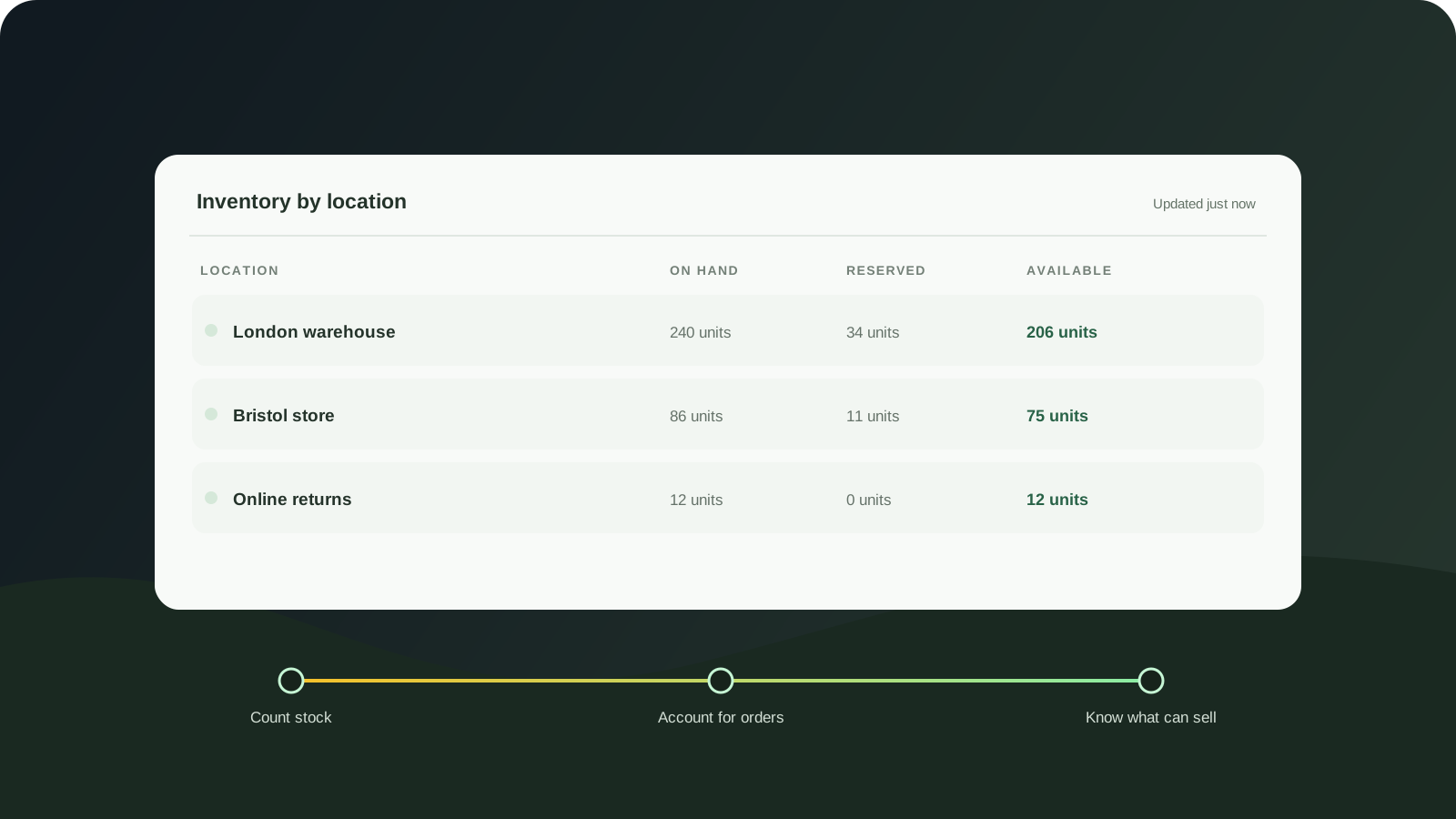
On-hand stock tells you what is recorded at a location. Reserved stock accounts for units committed to orders. Available stock is what remains for new purchases after those commitments are considered.
Keeping those quantities distinct gives the team a more useful view than one undifferentiated count. It also makes conversations clearer: a product can have units on hand while having fewer units available to sell.
Stoify’s inventory workflow keeps on-hand, reserved, and free stock visible across locations. Teams can adjust stock from the inventory list and review where a product is held without switching to a separate system for each location.
Make location part of the decision
Location matters when a team is deciding whether it can fulfill an order quickly, transfer stock, or make a product available in a region. A single total can hide that a product is unavailable in the place where fulfillment needs it.
For growing brands, a practical inventory process should make it easy to:
- Check stock at each location.
- Understand which units are committed to orders.
- Update counts after receiving or correcting stock.
- See when a product is running low before it becomes unavailable.
This is operational clarity, not just reporting. The view should help someone decide what to do next.
Connect stock changes to the customer experience
Inventory accuracy affects product availability on the storefront. It also shapes customer expectations after an order is placed. If a stock count says something is available when it is not, the team has to recover that trust later.
When an item does run out, back-in-stock alerts can let interested shoppers ask to hear when it returns. The capability is optional, so teams can enable it when it fits their workflow.
Start with the questions your team asks every day
Inventory software does not need to turn stock work into a warehouse project. Begin with the questions that affect the next action: How many can we sell? Where is the stock? What is already reserved? Which items need attention?
Answering those questions from the same system that holds product and order information helps a small team stay confident as locations and order volume increase.
Continue exploring
Related Stoify articles and feature pages connected to this topic.
Inventory
Multi-location inventory built for calmer operations
Track stock across locations without splitting your team across extra tools. Stoify keeps on-hand, reserved, and available inventory easier to understand from day one.
Customer retention
Back-in-stock alerts
Turn out-of-stock demand into helpful, variant-aware customer notifications.